

Updated May 2026 to reflect the latest policy-as-code configuration format and an improved Conventional Commit sample.
Conventional Commits bring order and traceability to your Git history, but Bitbucket Cloud has no native mechanism to enforce them. Unlike self-hosted Git servers, Bitbucket Cloud cannot run pre-receive hooks or block merges based on commit content out of the box.
In this guide for engineering managers and Jira admins, we explain the Conventional Commits format, why it matters in regulated and high-velocity environments, and how to enforce it automatically in Bitbucket Cloud using a policy-as-code approach.
What are Conventional Commits?
Conventional Commits is a specification for structuring Git commit messages in a consistent, machine-readable format.
A conformant message starts with a type (such as feat), an optional scope in parentheses, and a short imperative description.
The format is designed to be both human-readable and machine-parseable, enabling automated changelog generation, semantic versioning, and traceability tooling.
SW-424 feat(auth): add OAuth2 login

Add an OAuth2-based login flow using the existing identity provider,
replacing the legacy username/password form.
In Jira-based workflows, teams extend the format with a work item key, as shown above, so every commit is traceable to a requirement, task, or change record.
How to write Conventional Commit messages
Crafting commit messages that follow an agreed-upon convention is both an art and a science. Here's a structured approach to ensure clarity and consistency:
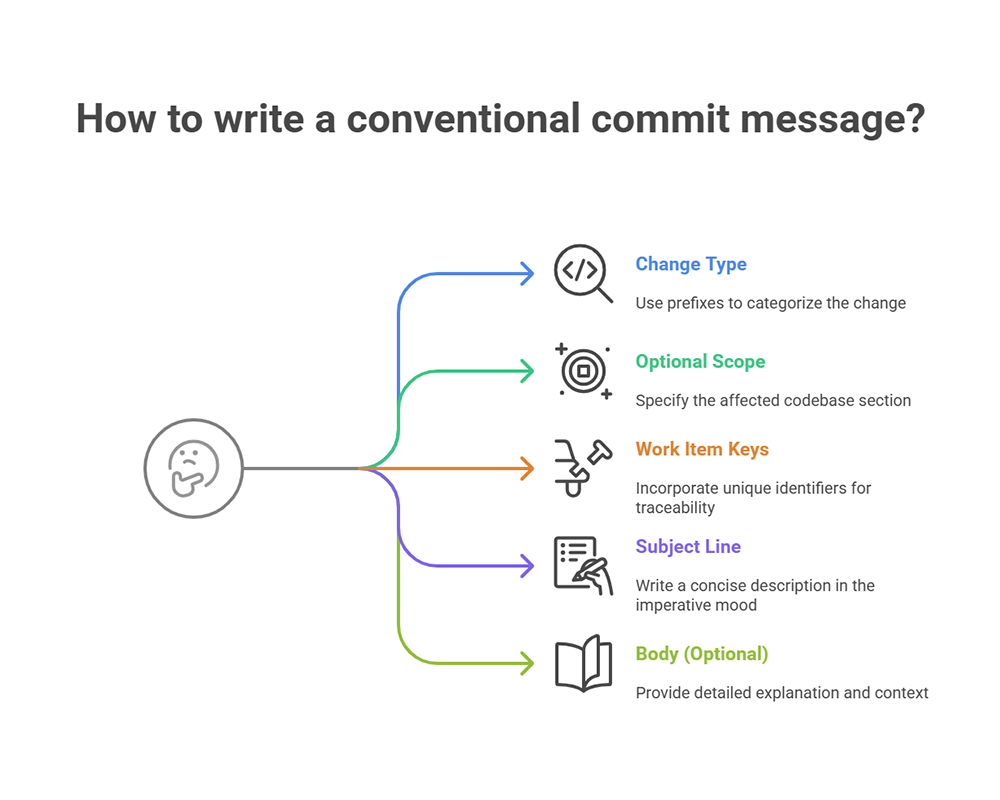
- Start with a change type: Use prefixes like
feat,fix,docs,style,refactor,test, orchoreto categorize the nature of the change. - Optional scope: Specify the section of the codebase affected, enclosed in parentheses, e.g.,
feat(login):. This helps clarify the context of the change, reducing the need for lengthy explanations. - Include work item keys: Incorporate a unique identifier such as a Jira work item key (e.g.,
SW-1234) to associate the commit with a requirement, task, or ticket. This makes tracking, traceability, and compliance verification significantly easier. - Subject line: Write a concise description of the change in the imperative mood, limited to 50 characters.
- Body (optional): Provide a detailed explanation of the change, its rationale, and any relevant context. Wrap lines at 72 characters. Conventional commit messages follow the Git 50/72 rule.
📄 Try these copy-ready templates: Git commit message templates you can copy.
Examples of good Conventional Commit messages
Understanding the theory is one thing; seeing it in practice helps you and your team adopt best practices and use them in the production development workflow. Here are some examples of well-structured commit messages.
Commit message after code review:
SW-578 fix(ui): Address header alignment feedback

Adjusted CSS in the header component to resolve the alignment issue
identified during code review. Incorporated reviewer suggestions for
improved cross-browser consistency.
A commit message after code review documents changes made in response to feedback. A good post-review commit message should summarize the adjustments, and reference requirements they are tied to. This helps reviewers and future maintainers quickly understand if the required changes were made, streamlining audits and knowledge sharing.
Feature addition:
feat(profile): Enable avatar uploads

Users can now upload avatars to personalize their profiles.
Implements: SW-901
Documentation update:
docs(readme): DOC-566 Update installation instructions

Clarified steps for setting up the project locally.
These examples demonstrate clarity, linkage to relevant tasks, and adherence to the Conventional Commits format. Notice that some messages contain Jira work item links at the very beginning of the message, some have it elsewhere. The specification doesn't determine exactly where they should be placed so all of the above comply with its rules.
Why commit message conventions matter in Bitbucket Cloud
Commit messages are more than annotations; they're a source of truth and compliance evidence. Adopting a format like Conventional Commits in Bitbucket Cloud helps every team member communicate change intent consistently, which is especially important for high-velocity or regulated development environments.

Benefits of Conventional Commits:
- Improved traceability: Link code changes directly to Jira work items, enabling faster audits and post-incident reviews.
- Developer accountability: Clear formatting reinforces ownership and helps teams catch context-lacking changes early and recall motivations behind changes after years.
- Automated tooling compatibility: Commit conventions power changelog generation, smart commits, and semantic versioning.
- Audit & compliance: A standardized structure ensures that every change is traceable to a work item, assignee, and requirement, which is crucial for regulated industries.
Bitbucket Cloud has no server-side hook mechanism. Unlike self-hosted Git servers, it cannot run pre-receive hooks that validate commit messages before they land in the repository. This means there is no native way to reject a non-conformant commit or block a pull request merge based on commit content or Jira work item state.
Enforcing Conventional Commits in Bitbucket Cloud requires an app-layer enforcement policy. There is no workaround using native Bitbucket settings, Jira workflows, or Git configuration alone.
Enforcing commit message conventions automatically
For a broader overview of how commit policies work in Bitbucket Cloud — including merge checks, branch rules, and PR validation — see Commit policy enforcement in Bitbucket Cloud.


While educating the team on best practices is essential, real consistency requires automated enforcement. Better Commit Policy for Jira Cloud, together with Better Commit Policy Connector for Bitbucket Cloud, offers a unique enterprise-ready solution for enforcing commit message standards in Bitbucket Cloud.
With policy-as-code, you define commit rules in a ".commitpolicy.yml" file placed in the root of your repository. This file describes exactly what makes a commit acceptable, such as message length, required format, or Jira work item links. The app automatically evaluates every commit and pull request against these rules at two stages:
- whenever a developer commits a change (if they activated pre-commit checks)
- whenever a developer creates a pull request or updates an existing one with new commits
If the commit message fails to match your required format, such as not starting with feat, fix, or another allowed type, or missing a valid Jira work item key, the change is rejected. One capability that has no native equivalent in either Jira or Bitbucket: you can require that the referenced work item is currently In Progress and assigned to the committing developer. Git, Bitbucket, and Jira each operate in isolation and none of them can enforce cross-system rules at commit or merge time. Better Commit Policy is the integration layer that makes this check possible, closing a gap that no native Atlassian tooling can close.
Pre-commit hooks verify changes at commit-time ensuring that only compliant commits are accepted. If a commit violates the policy, it is rejected, and the developer receives clear instructions on how to fix it.
Checking commit...
✗ Rejected
Commit message "FOO-1 Fix NullPointerException" must match the pattern <([A-Z][A-Z\d]+-\d+\s)?(build|chore|ci|docs|feat|fix|style|perf|refactor|revert|test)(\([\w\-\.]+\))?!?: .+(\n\n[\s\S]*)?>
▸ Commit messages must adhere to the Conventional Commits specification.
Better Commit Policy also integrates directly with Bitbucket's merge checks, so non-compliant changes are flagged, or on Bitbucket Premium they actually cannot be merged.
And because every violation is shown in Bitbucket too, developers get fast feedback and can fix problems before they affect the main branch. It's the foundation for teams that want to align developer workflows with structured change management.
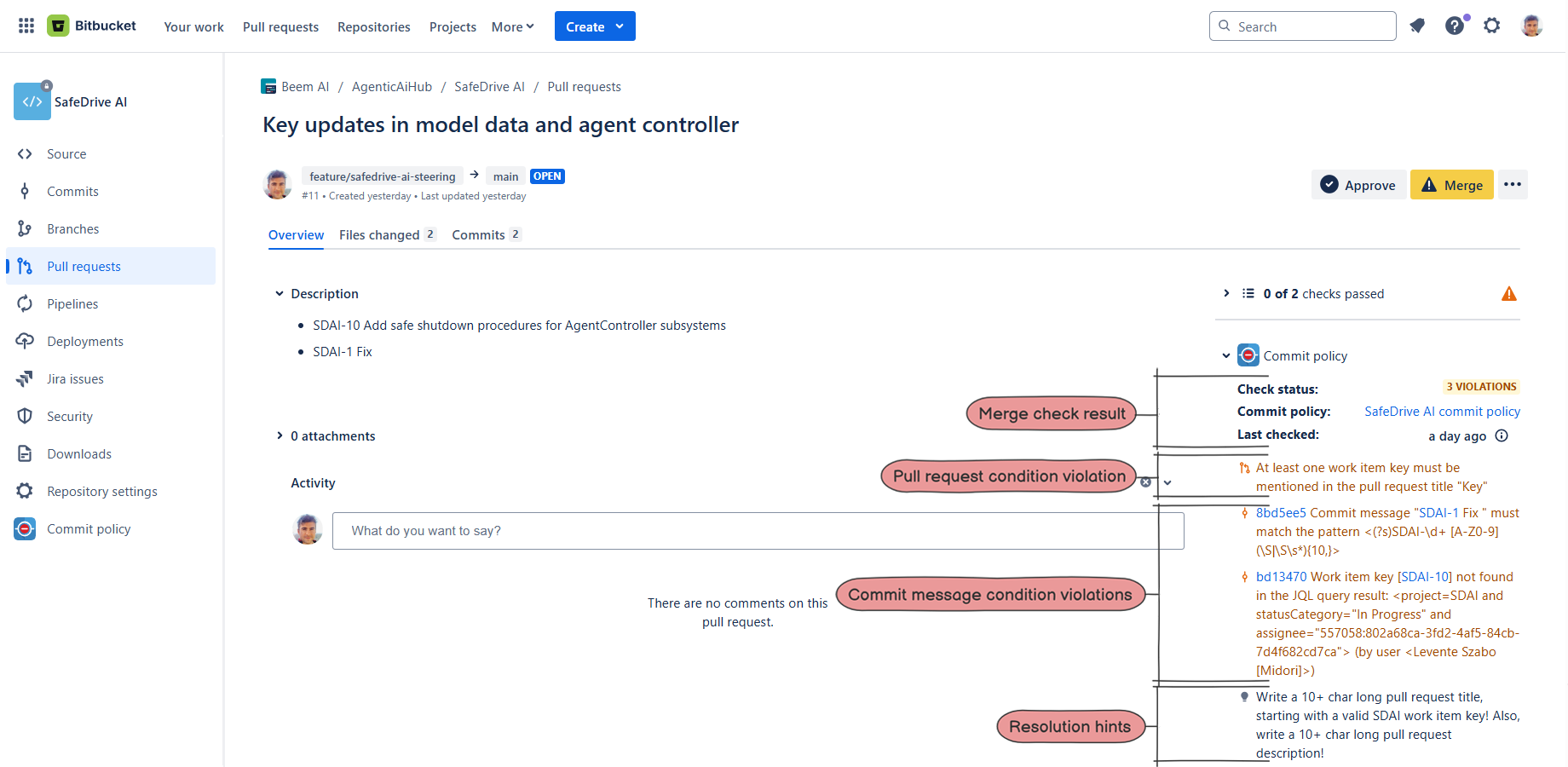
Sample commit policy configuration
This is an example of how you define your conventions in Bitbucket Cloud, in a "policy-as-code" fashion.
Without policy-as-code, teams typically maintain per-repository hook scripts or fragile CI checks that run after the commit is already in history which is already too late to enforce.
The .commitpolicy.yml file centralizes all rules in a single, version-controlled configuration.
This policy enforces the following rules:
- Clear commit message and pull request formatting, with links to Jira work items
- The mentioned work items have to be in the In Progress status category and their assignee or reporter must be the committer user or the pull request author
- The source branch's name (where code changes originate from) has to start with feature/ followed by a work item key, a dash, and at least 5 characters
- However, if the committer is John Doe, then the check for that commit is skipped entirely
You can start using this policy by overwriting your current .commitpolicy.yml file with the code below, and replacing <connection-id> with your VCS connection ID (keep the quotation marks around the string).
commit-policy:
  name: "Conventional Commits policy"
  description: "🛡️️ Compliance rules that adhere to the Conventional Commits specification."

vcs-connection:
  id: "<connection-id>"

commit:
  rejection-message: "Commit messages must adhere to the Conventional Commits specification."
  message:
    pattern: '([A-Z][A-Z\d]+-\d+\s)?(build|chore|ci|docs|feat|fix|style|perf|refactor|revert|test)(\([\w\-\.]+\))?!?: .+(\n\n[\s\S]*)?'
    work-item:
      jql: 'statusCategory="In Progress" and assignee="$commit.author" or reporter="$commit.author"'
      count: "1+"
      non-matching: reject
  author:
    skip-pattern: "John Doe"

pull-request:
  rejection-message: "Pull request summaries must adhere to the Conventional Commits specification. Also write a 10+ characters long pull request description."
  title:
    pattern: '([A-Z][A-Z\d]+-\d+\s)?(build|chore|ci|docs|feat|fix|style|perf|refactor|revert|test)(\([\w\-\.]+\))?!?: .+'
    work-item:
      jql: 'statusCategory="In Progress" and assignee="$pull-request.author" or reporter="$pull-request.author"'
      count: "1+"
      non-matching: reject
  description:
    pattern: '(\S\s*){10,}'
  source-branch:
    pattern: 'feature/[A-Z][A-Z\d]+-\d+-.{5,}'

setting:
  reject-on-error: true
Do you want to customize this commit policy? Read the configuration reference.
For a deeper look at what pull request rules you can enforce in Bitbucket Cloud beyond commit messages, see Pull request rules in Bitbucket Cloud.
Start using commit policies in Bitbucket Cloud
Better Commit Policy apps are used by companies that take traceability seriously. They are trusted in aerospace, medical devices, fintech, automotive, and enterprise SaaS-industries with regulated product requirements or engineering teams with significant responsibility.
👉 Better Commit Policy for Jira Cloud - The central app managing the connections between Version Control Systems and your Jira Cloud.
👉 Better Commit Policy Connector for Bitbucket Cloud - The Bitbucket app where you manage your policy as code. It implements the native merge check that enforces commit and PR rules.
Start a free trial and take control of your Bitbucket commits!
