

In this page
Assets integration features
Assets integration vs. the Assets built-in PDF exports
Tutorial video
Assets PDF export samples
Jira issue with Assets objects
Jira issue list with Assets objects
Configuration
Configuring the Assets custom fields
Configuring the export format for the Assets custom fields
Learn more about Assets
What is Assets?
(supported since Better PDF Exporter 5.9.0)
Assets is Atlassian's platform app for asset management, that allows implementing CMDB, CRM, HR, ITSM or ITIL functionality on the Jira platform.
Assets integration features
- You can export all Assets-managed custom field types like Assets object, Assets object (single) (legacy), Assets object (multi) (legacy), Assets referenced object (single), Assets referenced object (multi) and Assets readonly object to PDF.
- You can configure the export format to include object names (e.g. "My awesome server"), object keys (e.g. "My awesome server [SRVR-123]"), object attributes (e.g. "My awesome server [SRVR-123] (Manufacturer=Cray Research, Vector Processors=4, Type=Supercomputer)") and any combination of these.
(Need more features? Tell us in a support ticket!)
Assets integration vs. the Assets built-in PDF exports
You may want to ask: if Assets has a built-in PDF export feature, why would you use another app for the same?
While the Assets built-in PDF exports may be sufficient for basic use cases, the Better PDF Exporter integration is more powerful in, at least, these:
-
It supports PDF automation.
You can export, email and attach PDF files using Automation for Jira (visual automation rules), ScriptRunner (Groovy scripts), or the REST API (use your favorite language!). -
It is extremely customizable.
Instead of accepting the pre-defined export types in Assets, you can define your own types via PDF templates. -
It supports all the powerful PDF features.
You can use custom calculations in Groovy (sorting, complex math, data integration, etc.), embedded attachments, PDF bookmarks, charts, graphics (in Groovy, SVG, QR codes and barcodes, etc.), among others. -
It is integrated with all the popular Jira apps.
You can freely combine Assets data and other apps' data in the same PDF file. -
It comes with powerful templates optimized for Assets.
You can use those "as is", or customize them to your needs. - It is well-documented with the customization guide, the Expression Reference Manual, the recipes, and such.
If at least one of these is important for you, give the app a try.
Tutorial video
Watch this short introductory video to see how fast you can export your Assets data to PDF!

Assets PDF export samples
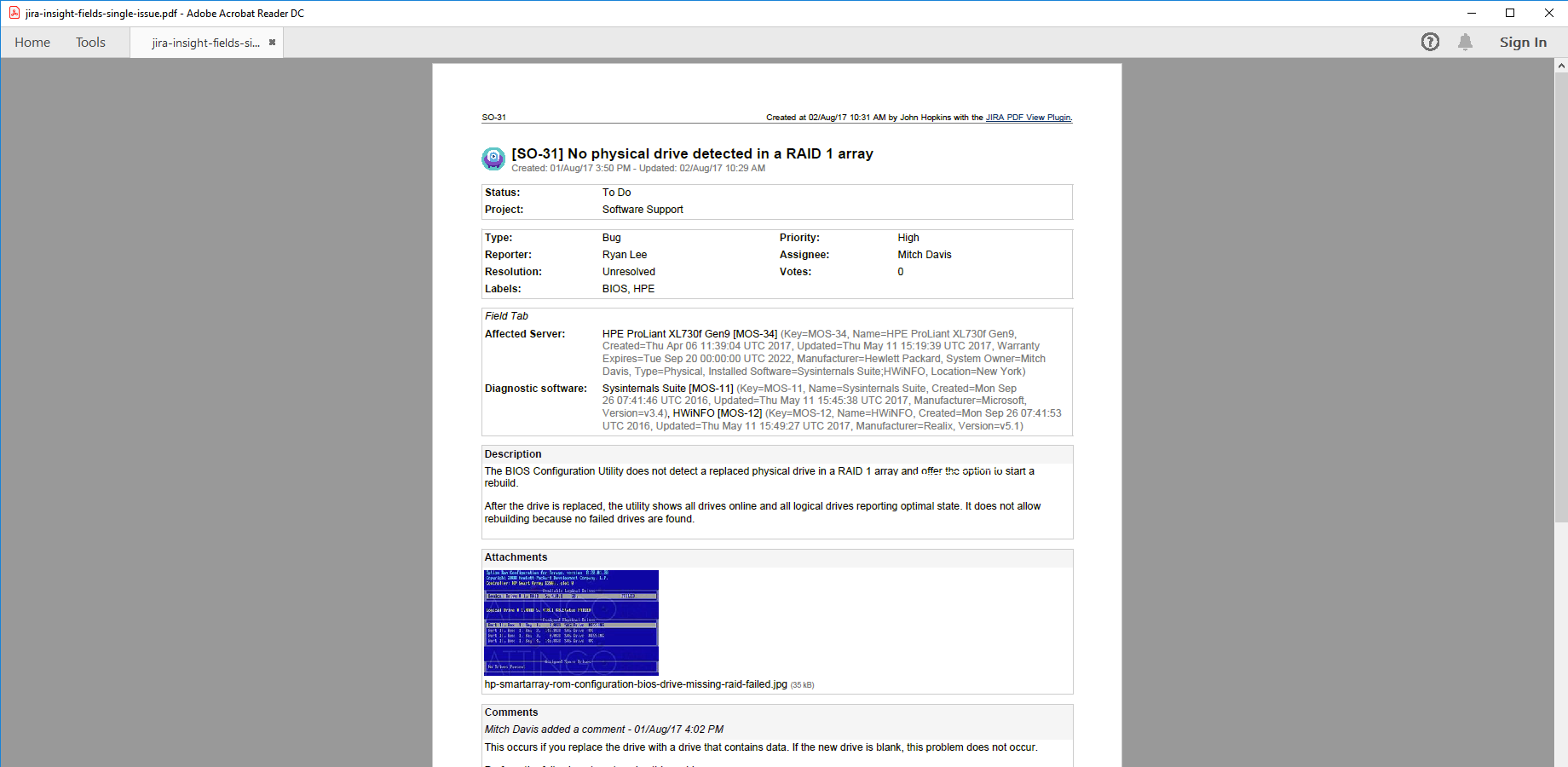
Jira issue with Assets objects
This straightforward PDF document (created using the default issue-fo.vm template) contains a single Jira issue with two Assets custom fields. In addition to object names and keys, attributes are exported as comma-separated name-value pairs in brackets (the format is completely customizable).

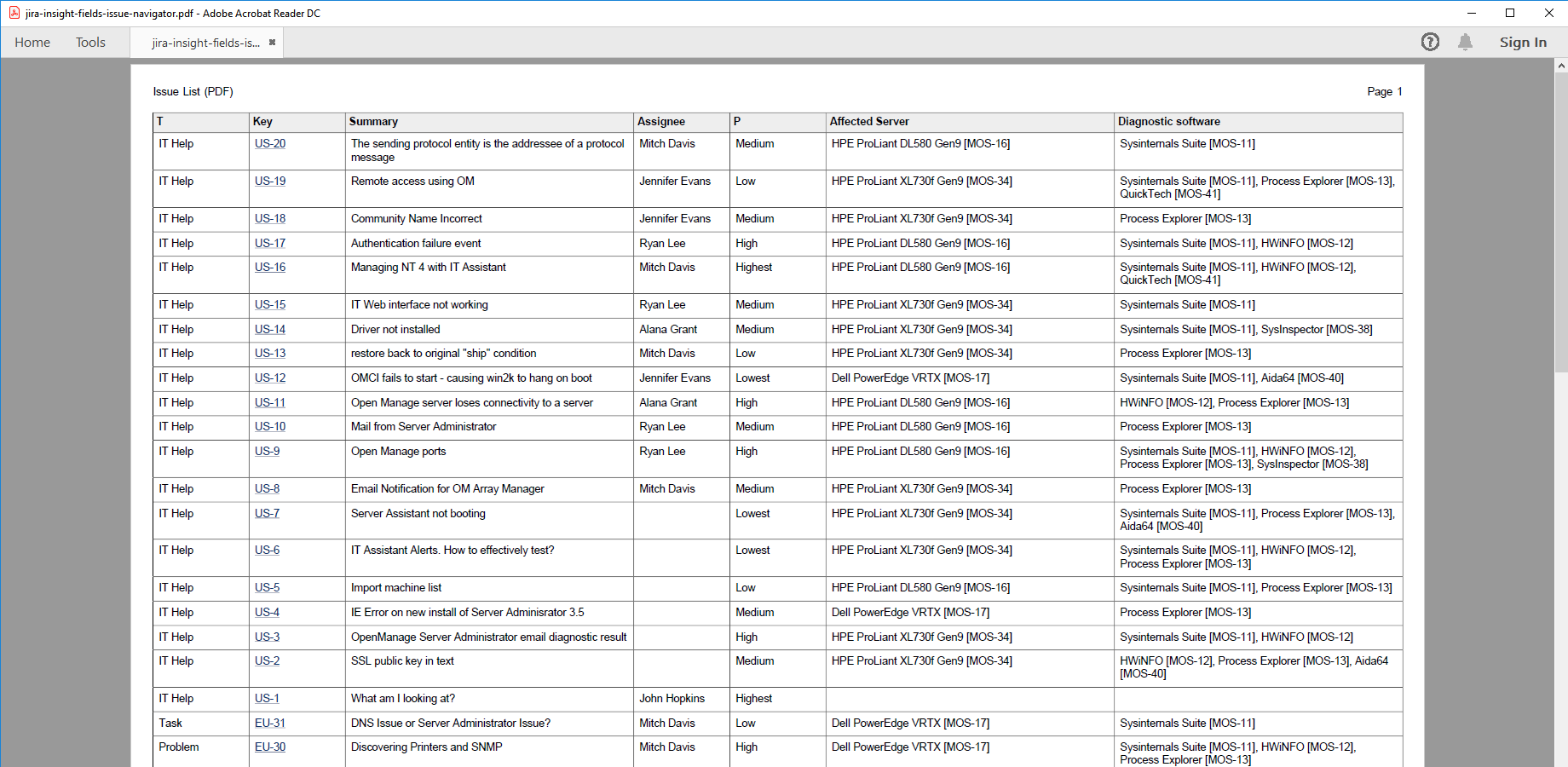
Jira issue list with Assets objects
Assets custom fields (see the 2 rightmost columns) are also supported when bulk-exporting Jira issues to a table in a PDF document. In this example, attributes are turned off for a more compact content.
Configuration
Configuring the Assets custom fields
There is nothing to do. Better PDF Exporter will automatically recognize the Assets-managed fields and export them accordingly.
Configuring the export format for the Assets custom fields
You can flexibly configure what Assets object properties are exported and in what format in the issue-fo.vm and issue-navigator-fo.vm templates.
The default behavior is that object names and object keys will be exported (e.g. "My awesome server [SRVR-123]"). You can include object name, object key and attributes by setting these configuration variables in the top part of the template:
## Insight
#set($exportInsightObjectNames = true) ## set to "true" to export Insight object names
#set($exportInsightObjectKeys = true) ## set to "true" to export Insight object keys
#set($exportInsightObjectAttributes = false) ## set to "true" to export Insight object attributes
If you want full control over the export format, look at the Velocity macro definition marked with this comment in the template:
## Insight custom field types
## ...
Note: you can absolutely use different export formats in the different templates, as issue-fo.vm typically has more space for the object details.